


Design used to feel like a closed club. You either learned Figma inside out or paid someone who did. Canva made things easier for everyday folks, but it still meant hunting templates and tweaking layouts by hand.
Now Anthropic has dropped something different. The design helps us understand how to get Claude in a real way within a very short time. Prototypes, slide decks, landing pages, one-pagers, you name it no design degree required. It launched on April 17, 2026, and people are already calling it a game-changer for teams that move fast.
It is not a copy of any other app. It is doing something new: turning natural conversation into on-brand, interactive work that actually feels like yours.
What Exactly Is Claude Design?
Claude Design is a brand-new product from Anthropic. Think of it as a smart canvas that lives inside Claude. You type (or paste) what you want, and Claude builds it live on the right side of the screen while you chat on the left.
It runs on Claude Opus 4.7, Anthropic’s strongest vision model yet. That means it does not just spit out pretty pictures. It understands layout, spacing, brand rules, and even how things should behave when you click them.
Right now, it is in research preview. If you have a Claude Pro, Max, Team, or Enterprise subscription, you can head to claude.ai/design and try it. Access is rolling out gradually. It uses your existing plan limits, with an option to buy extra usage if needed.
How Claude Design Works in Real Life
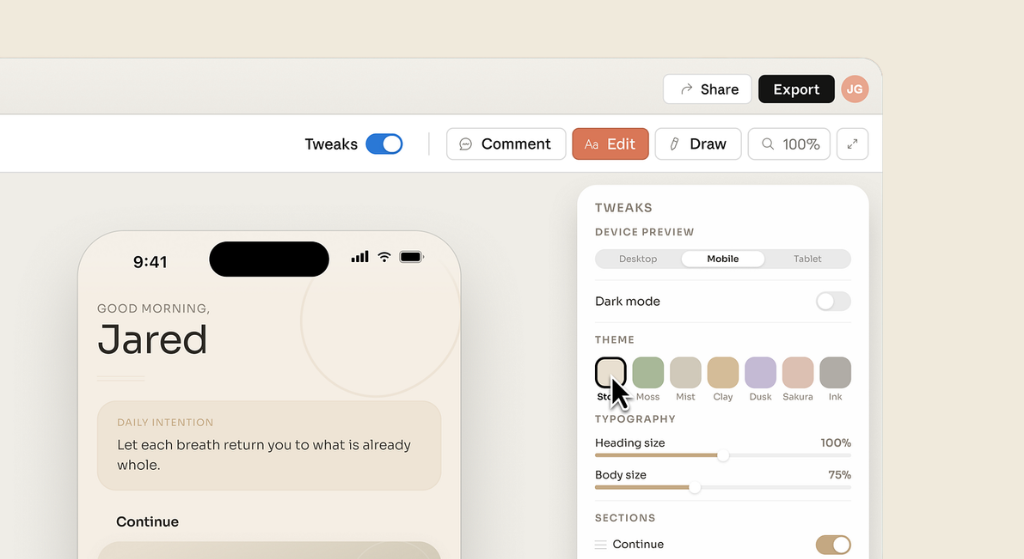
The interface is dead simple: chat on the left, live canvas on the right.
Here is the usual flow:
- Start a new project: Claude automatically reads your codebase or design files and builds your brand system, colours, fonts, buttons, cards, everything. No more explaining your style every time.
- Give it context: Upload screenshots, a slide deck, a DOCX file, or even point it at your live website with the web capture tool.
- Describe what you want: A single clear prompt is often enough.
- Watch it build: Then refine with chat, inline comments, or smart sliders Claude creates on the fly.
- Export or hand off when you are done.
The whole thing feels like having a patient designer sitting next to you who never gets tired and remembers your brand perfectly.
Standout Features That Actually Matter
- Automatic brand consistency: Your design system loads instantly. Every new project already looks like you.
- Smart exports: PDF, PowerPoint, standalone HTML, ZIP, or send straight to Canva.
- Seamless handoff to Claude: Code: One-click packages everything for developers: no more blurry screenshots or long handoff meetings.
- Team sharing: Private links, view-only, or full edit access with group chats that include Claude.
Early users say complex pages that needed 20+ prompts in other tools now take just two here. One team turned a week of back-and-forth into a single conversation.
Real Examples You Can Try Today
Prompt example for a dashboard:
“Create a clean dashboard showing monthly revenue with filters for region and product line. Use our brand colours and make it responsive for desktop and tablet.”
Prompt example for mobile onboarding:
“Design a 4-screen mobile app onboarding flow that walks new users through our core features. Keep it friendly and simple.”
Prompt example for a pitch deck:
“Build a 10-slide pitch deck for our new API product. Include a hero slide, problem statement, demo screenshots, and pricing. Make it on-brand and ready to export to PowerPoint.”
It handles interactive stuff too: clickable buttons, forms that respond, even simple animations in prototypes.
How It Stacks Up Against Figma and Canva
Vs Figma
Figma wins for pixel-perfect, multiplayer design work with hundreds of components and plugins. It is the pro standard for a reason.
Claude Design wins for speed and ideation. You can go from rough idea to working prototype before the Figma file even opens. Many teams now use both: Claude for fast exploration and early feedback, Figma for final polish.
Vs Canva
Canva is fantastic for quick social graphics and simple presentations. Claude Design goes further. It creates interactive prototypes and full layouts that feel custom-built. The direct “Send to Canva” button means you get the best of both: Claude’s intelligence plus Canva’s easy editing.
The big difference? Claude Design thinks in conversation. You do not drag and drop. You collaborate.
The Honest Limitations (It Is Still a Preview)
It is early days, so expect a few bumps:
- Usage can burn fast: Some Pro users report burning most of their weekly allowance in 30 minutes of heavy prototyping.
- Occasional bugs: inline comments sometimes vanish before Claude reads them. Large codebases can cause lag.
- It is web-only right now and works best with clear, specific prompts.
These are preview issues. Anthropic is rolling out fixes based on feedback.
Actionable Tips to Get Better Results Faster
- Start specific but simple. Give the goal, audience, and key layout first. Add polish later.
- Use your design system names: “Use the Primary Button component here.”
- Ask for variations: “Show me two different layouts for this section.”
- Let Claude review: “Check this for accessibility and information hierarchy.”
- Save versions often: “Save what we have and try a completely different approach.”
- Think mobile from the start: mention “responsive for desktop, tablet, and phone.”
Who Should Use Claude Design Right Now?
- Founders and product managers who need to visualise ideas quickly.
- Marketers are creating campaign assets and landing pages.
- Small teams or solo builders who hate the design-to-dev handoff pain.
- Designers who want to explore more directions without burning hours.
If you already love Figma and have a big design team, this will not replace your workflow overnight. But it might become your fastest way to test ideas.
Will Claude Design Replace Figma and Canva?
Not completely, not yet. But it is already changing how many people work. The old way (brief to mockup to review rounds to handoff) is getting shorter. For many everyday design tasks, the conversation-first approach feels more natural.
Anthropic built it to play nice with other tools, not replace them. The future looks like a mix: Claude for speed and ideas, Figma for precision, Canva for quick shares.
Final Thoughts
Claude Design is not perfect, but it is the first tool that makes professional visual work feel accessible and fun again. If you have ever wished you could describe what is in your head and see it come to life, without learning another design app, this is it.
Try it at claude.ai/design while it is fresh. The rollout is still underway, so your access might appear at any time. Once you are in, start small, iterate fast, and see how much faster your ideas move from brain to screen.
The design world just got a lot more democratic. And honestly? It is about time.
